
WhatsApp sound stickers: what they are, where to find them, how to send them
Sound stickers are the new fun in WhatsApp chats: short video stickers that also play their sound when tapped. This guide explains what they are, where to find them on WhatsApp, how to send them in your chats and how to get your own video turned into one.
In short
- A sound sticker is a short video sticker that plays its audio when tapped.
- The easiest way to find them is to follow the Sesli Sticker WhatsApp channel: new ones are shared every day.
- Use the forward arrow next to a sticker to send it to any chat.
- You can upload your own video on this site for free; if it fits, it is shared on the channel as a sound sticker.
What is a sound sticker?
Classic stickers are image only. A sound sticker is made from a short video and plays its audio when you tap it: a famous line, a laugh, a perfect reaction. Your reply arrives with its sound.
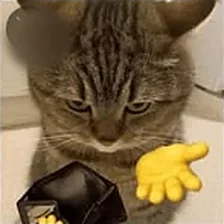
They are also called audio stickers, stickers with sound or video stickers; it is all the same thing. Below are a few sound stickers shared on our channel.


Where can I find sound stickers on WhatsApp?
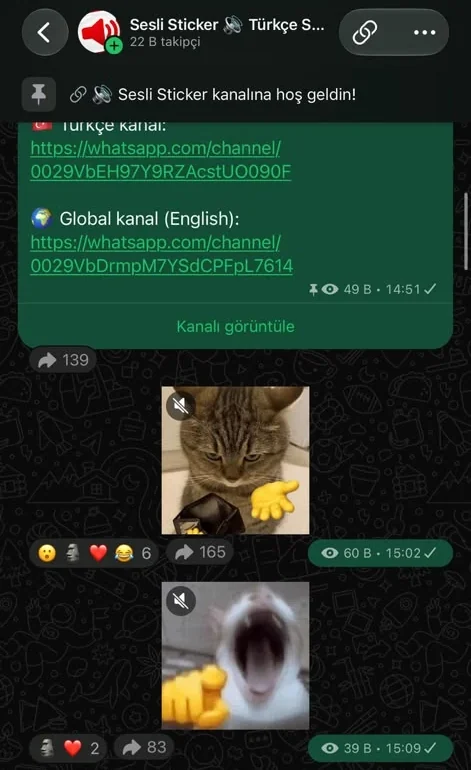
The easiest way is to follow the Sesli Sticker WhatsApp channel. New sound stickers are shared there every day. The channel is free, needs no sign-up, and your phone number is not shown to other followers.
Open the channel and tap “Follow”; new stickers then show up in WhatsApp’s “Updates” tab. Pick your language and join:


How do I send a sound sticker?
- Open the channel and find a sticker you like.
- Tap the sticker: the sound turns on so you can hear it.
- Tap the forward arrow next to the sticker.
- Choose the person or group and send.
No sound? Make sure your phone is not on silent and tap the speaker icon on the sticker.
How does my video become a sound sticker?
You don’t have to make the sticker yourself: send us the video and we do the rest.
- Tap “Choose videos” on the home page and pick your video. You can send several at once.
- Add a short note if you like, e.g. “make the sticker from 0:04–0:09”.
- Press “Send”. When we receive it you will see “Uploaded!”.
- We look at videos one by one. The ones that fit are queued and shared on the channel as sound stickers.
Sending a video is free and needs no account. We receive a lot of videos, so not all of them can be shared, and we can’t promise a position or a date.

Tips for a great sticker video
- Keep it short: moments under 10 seconds make the best stickers.
- Clear sound: little music or noise in the background.
- Pick one moment: a line, a reaction, a look. Long scenes get lost in a sticker.
- Vertical or square videos look better on a phone.
- Don’t send the same video again and again; once is enough.
What is not accepted?
Spam, ads and unrelated content; obscene, violent or hateful videos; footage exposing someone’s phone number, address or private details. If you see yourself in a video and want it removed, reach us through the “Write to us” form.
Questions people ask about sound stickers
Will my uploaded video be sent back to me as a sticker?
No. This site is not a sticker maker or a download tool. Your video goes to the channel team; if it fits, it is shared publicly on the channel as a sound sticker, and you use it from there like everyone else. No file is sent back to you.
Who can see the video I send?
At first only the channel team. Videos that fit are shared publicly on the channel as sound stickers, so don’t send private videos. Videos that don’t fit are never published and are deleted within 30 days.
Will I be told if my video is shared?
No, we can’t notify people one by one: uploading needs no account and we receive a lot of videos. Follow the channel and you’ll see it there if it is shared.
Why wasn’t my video shared?
We receive many videos every day and can’t share them all. Videos that are too long, have unclear sound, were already shared or break the rules are usually not picked. In very busy periods the oldest videos may be removed before we get to them. You can try again with a short moment with clear sound.
Which languages do the Sesli Sticker channels come in?
There are three channels: Turkish, Azerbaijani and English (global). Pick yours from the channel list above; you can follow all of them if you like.
Is Sesli Sticker an official WhatsApp site?
No. Sesli Sticker is an independent channel and website and is not affiliated with WhatsApp or Meta. The stickers are shared on our WhatsApp channel, and we use this site to collect videos.
Send your video now Sesli Sticker channels Frequently asked questions